How to save tokens with Claude Code and the other agents
How to pay for a token, what clears the cache, and a comprehensive guide telling you when to clear the cache or change the template.
Date: 25 Nov 2026 · 13 min read
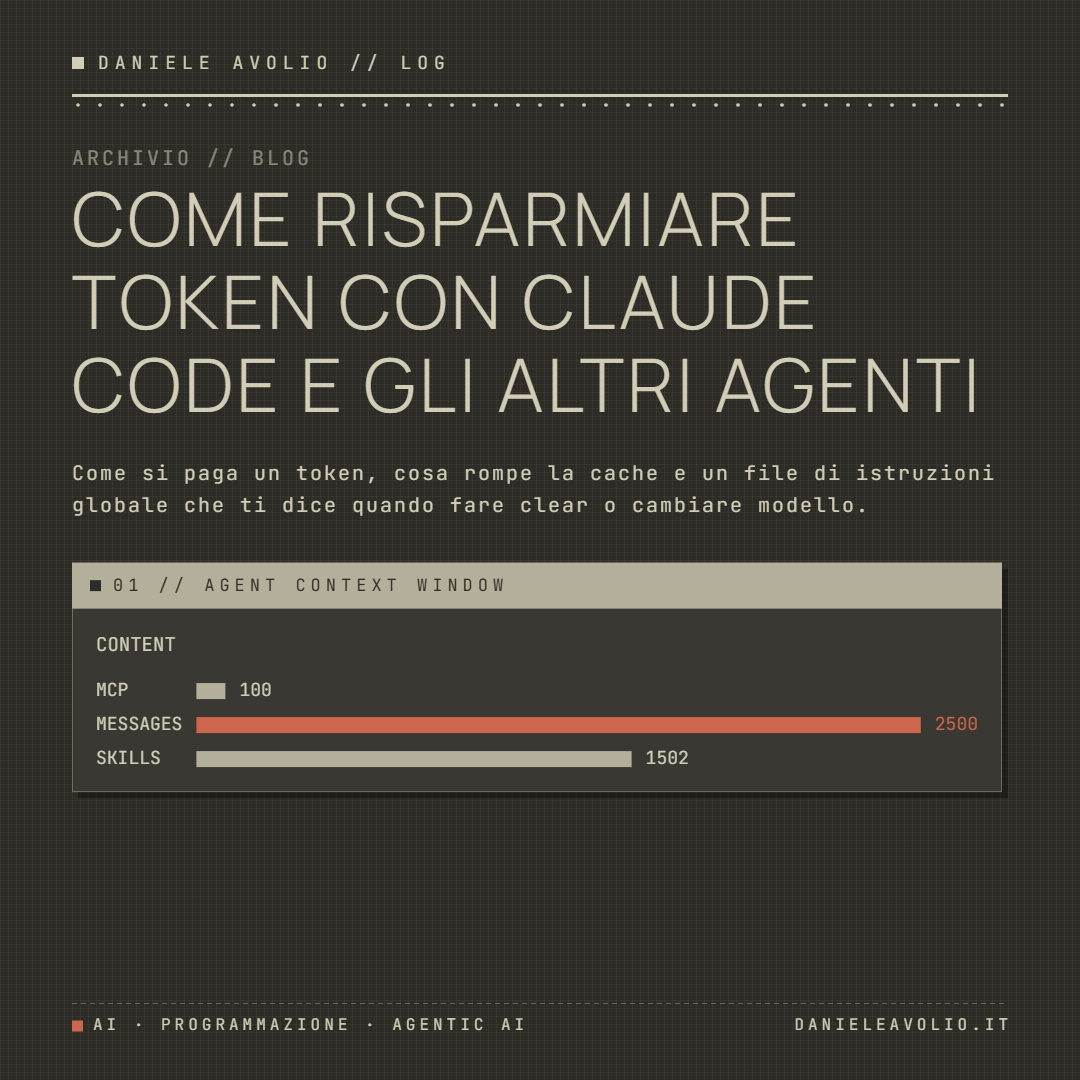
Every message you send to a coding agent carries the entire conversation with it. The file you read two hours ago, the test output from twenty turns ago, that pointless grep search. Everything. Every turn.
I noticed that Claude Code was using too much resources, so I looked into why
So I started reading up on it: an article by Anthropic on the Claude Code blog, their Help Centre guide on models and limits, and a couple of posts on Medium about CLAUDE.md. In the end, this resulted in a set of general instructions that I use for all agents and which, amongst other things, tells me when it’s time to /clear or switch models.
Here I’ll explain how session costs work, what’s in the file and how to use the same file with Claude Code, Codex, OpenCode e Gemini CLI.
How much does a token cost?
It depends. You pay per token, but what you’re actually paying for is the GPU time required to run the model on your tokens. And not all tokens cost the same.
A request goes through two stages:
Prefill: the model reads everything you send it. The system prompt, tool definitions, your
CLAUDE.md, the message and the entire conversation up to that point. These are the input tokens.Decode: the model generates the response, one token at a time. Reasoning, tool calls and text. These are the output tokens, and they cost about five times as much as the input, because each token represents a full pass through the model. This is an estimate
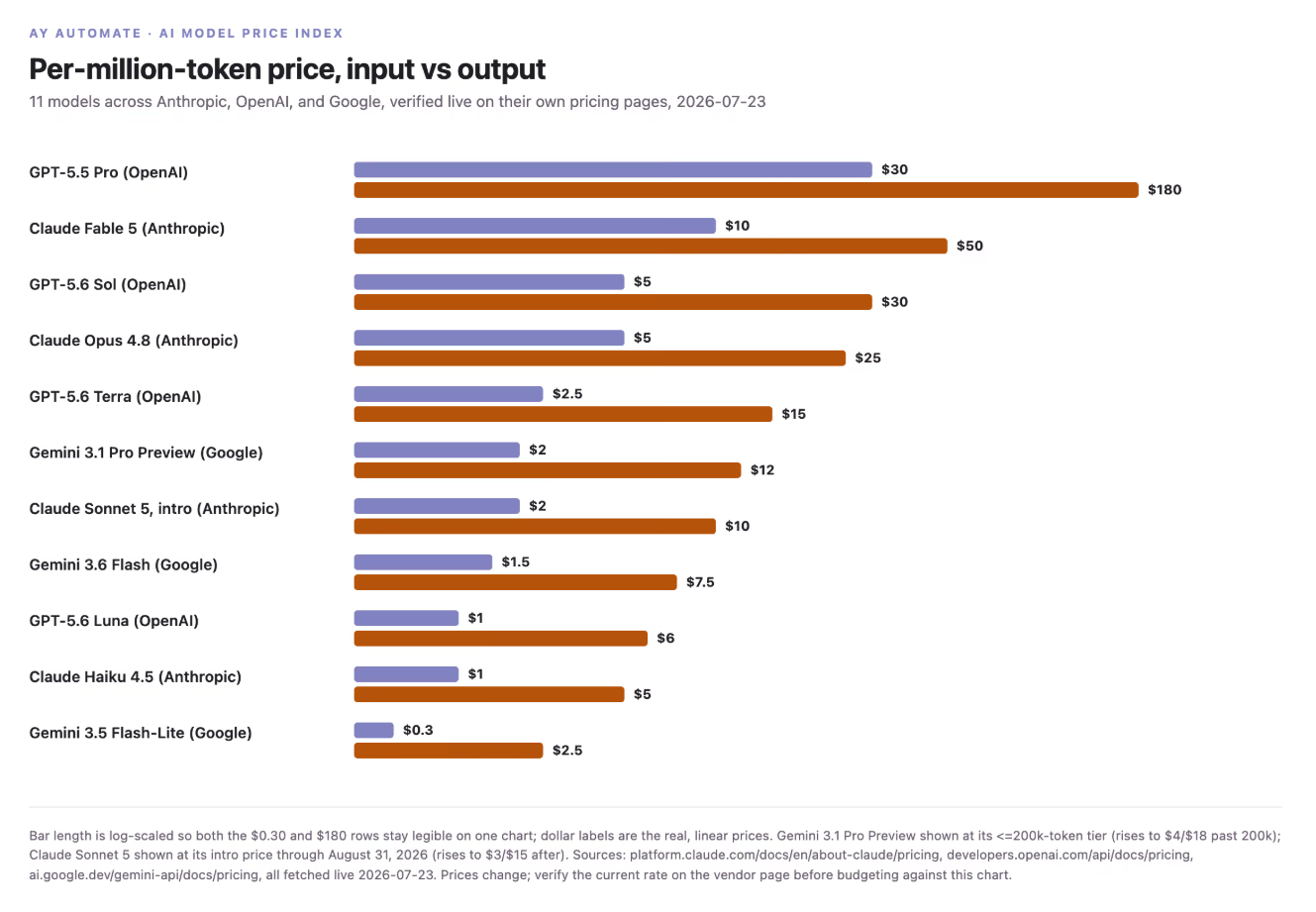
Then there’s the part that changes everything: prompt caching. If a request begins with the exact same tokens as a request it has just processed, the server doesn’t recalculate that section: it retrieves it from the cache. According to the Anthropic article, the ratios are as follows (input = 1):
So in a typical turn, this is what happens: the entire history is read from the cache at a tenth of the cost; only the new part (the file just read, the output of the last command) is charged at full price; and the response is charged at the output rate.
Put like that, it almost sounds free. Well. The problem is that ‘one-tenth’ multiplied by forty turns and a conversation of one hundred thousand tokens isn’t exactly small anymore. And even if you don’t pay per use, with a subscription it’s the same requests that eat into your limit.
Turn 40 re-reads the previous 39 turns
This is the thing that, in my view, few people realise. Nothing is sent just once. Everything that enters the context is resent in every subsequent turn, right up until the end of the session.
Think of a simple fix, such as
Fix the test that fails in utils.test.ts
sequenceDiagram
    participant U as Agente
    participant M as Modello

    U->>M: Richiesta 1: prompt + test
    Note right of M: tutto a prezzo pieno
    M-->>U: legge utils.test.ts

    U->>M: Richiesta 2: storia + file letto
    Note right of M: storia dalla cache (1/10)<br/>parte nuova a prezzo pieno
    M-->>U: legge utils.ts

    U->>M: Richiesta 3: storia + due file
    Note right of M: storia dalla cache (1/10)
    M-->>U: modifica il file

    U->>M: Richiesta 4: storia + diff
    Note right of M: storia dalla cache (1/10)
    M-->>U: lancia npm test

    U->>M: Richiesta 5: storia + output di npm test
    Note right of M: storia dalla cache (1/10)<br/>risposta a prezzo di output
    M-->>U: riassunto finale
That’s five requests, and each one contains everything that was there before. Now imagine the same thing at 17:30, in a session that’s been running since the morning, where you’ve already refactored, debugged an endpoint and read through thirty files. The fix is the same, but every request drags the whole day’s work along with it. And the model also has to ‘work around’ thirty files that have nothing to do with it, so it often performs even worse.
The two commands that solve this are:
/clearwhen you switch tasks. The conversation is discarded, butCLAUDE.mdthe project files remain. I really like the test suggested by the Anthropic Help Centre: if the next prompt would make sense in a new session, run clear before sending it./compactwhen you’re halfway through the same task and the first part is closed. It summarises the history and frees up space. It’s definitely worth doing.
What breaks the cache
The cache only works if the start of the request is identical, from the first token onwards. And the order is always the same: tool, system prompt, instructions (CLAUDE.md), conversation.
Adding something at the end (the last node) is the ideal scenario: everything that comes before remains in the cache. Changing something further to the left, on the other hand, forces a recalculation of everything that follows. Things that break the cache, according to the Anthropic article:
/model: every model has its own cache. Switch models mid-session and the next turn you’ll pay the full price for the entire conversation. This also applies toopusplan, which changes models every time you enter or exit plan mode./effort: the effort level is also part of the cache key. Same story.Fast mode: same as above, and on top of that, you pay for the recalculation at the fast-mode rate. If you want it, switch it on at the start.
/compact: it replaces the conversation with a shorter one, so nothing matches up anymore. However, writing the summary costs very little as long as the old conversation is still in the cache.
This has led to two habits I’ve started adopting:
Do
/compactbefore switching to a different part of the task.Use
/rewindinstead of/compactwhen the last few turns have gone in the wrong direction. Rewind only trims the tail, so everything that came before remains in the cache and costs nothing.
Please note: the sources do not agree on everything. Anthropic’s Help Centre recommends “plan with Opus, execute with Sonnet” and opusplan, and states that you can switch models without losing the conversation. It’s true, the conversation remains. But the most recent blog post explains that every switch clears the cache. I make the switch just once, explicitly, after the planning stage.
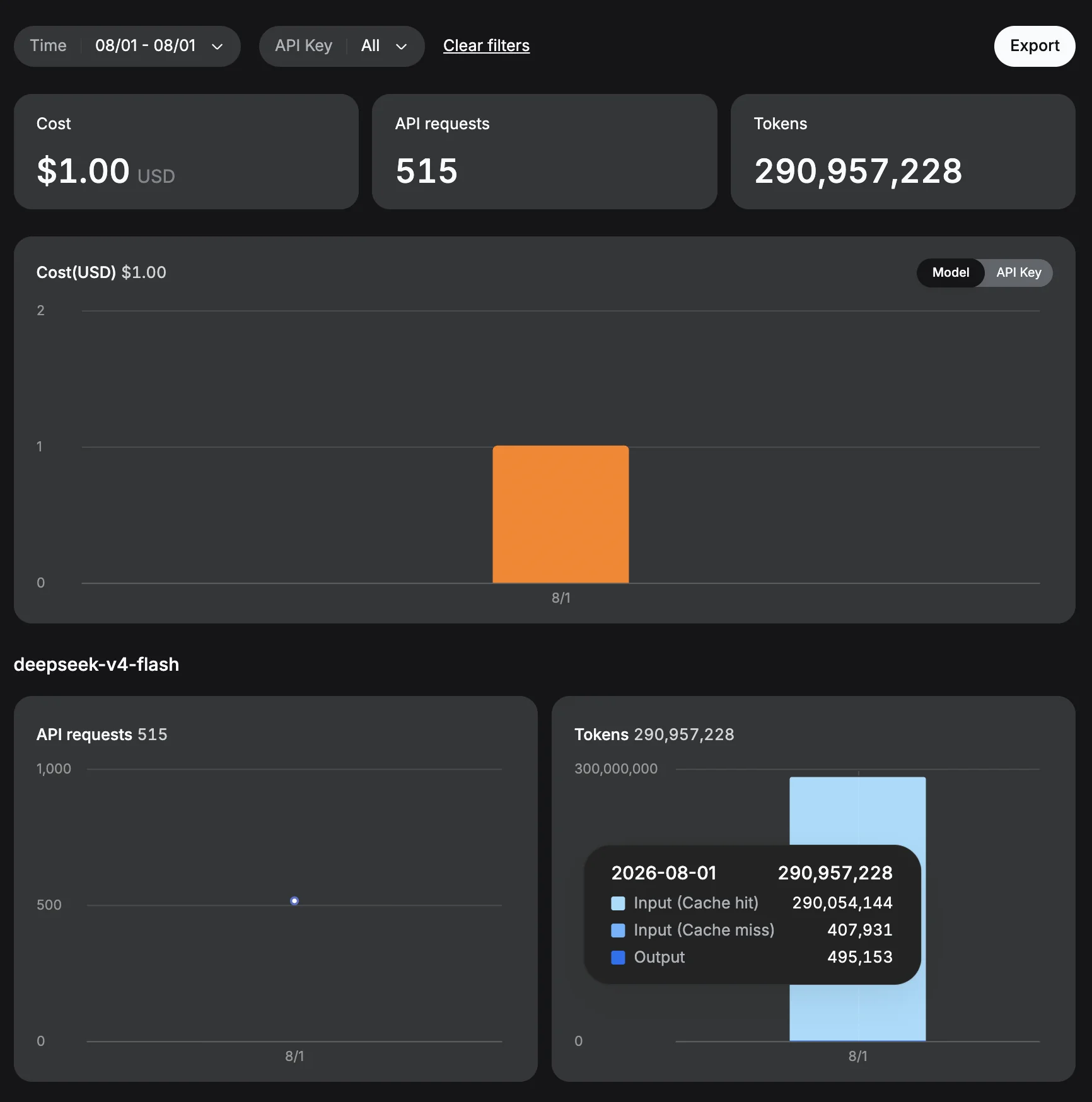
The mechanism of caching the prefix isn’t unique to Anthropic: other providers also cache prompts, with different pricing and durations. I won’t give you figures I haven’t verified, but the logic of ‘change something at the start of the request, recalculate everything’ applies everywhere. For example, DeepSeek is a model that relies heavily on caching:
The idea: the agent tells me
Right, fair enough. But in the middle of a debug session, I don’t remember to do /clear. I don’t even remember whether I’m using Opus, Sonnet or Sol.
The agent can’t just run /clear or /model on its own, because they’re harness commands, not model tools. But it can tell me. Just write it in the global instructions – the ones loaded into every session of every project.
First, though, one thing to bear in mind: that file is also sent at every iteration. It’s cached, so it’s cheap, but it takes up context. So it needs to be short. The rules I’ve taken from the posts I’ve read:
Less than 200 lines for the project file. For the global one, I keep it under 40.
Positive rules: ‘use X’ rather than ‘don’t use Y’. They cost fewer tokens and work better.
References, not copies: lengthy documentation goes into
docs/; in the file, you just write where to find it.Two-strike rule: you only add a rule the second time you correct the agent on the same issue. The first time is usually a one-off.
The file
Here it is. It’s in English because that’s the language I use when writing to the agent, but it works just as well when translated.
# Session efficiency (global)
Apply these rules silently. Mention them only when a trigger below fires.
## Session hygiene

You can't run session commands yourself, so flag them. When a trigger
fires, end your reply with ONE line starting with "💡", using this
harness's command name. Repeat it only if I ignore it and things get worse.

- My new request is unrelated to the previous task -> suggest a fresh
  session (clear / new).
- Same task, long session (~30+ turns, many big files or outputs read,
  or earlier details slipping) and the earlier part is done -> suggest
  compacting, and say what to keep.
- The last few turns were a dead end -> suggest rewinding to before
  them, if this harness supports it, instead of compacting.
- I say I'm stepping away -> suggest compacting first, while the cache
  is still warm.

## Model and effort

- Switching model or effort mid-conversation invalidates the prompt
  cache. Suggest it only at the start of a session or right after a
  clear, unless the mismatch is big.
- Small/fast model + low effort: renames, boilerplate, known bugs,
  simple edits, regex.
- Largest model + higher effort: multi-file refactors, hard debugging,
  architecture decisions.
- At the start of a task, if the current model clearly doesn't fit,
  say so once, in one line.
## Working cheaply
- Read selectively (search, line ranges). Reuse files already in
  context instead of reading them again.
- Use quiet flags or tail on noisy commands. For big logs or wide
  searches, use a subagent if available and report only the findings.
- For changes touching more than 3 files: list files and planned
  changes first, then wait for my OK.
- If finding the target would mean reading many files, ask one short
  question first.
- Be concise: no recap of what you just did. Prefer diffs to
  full-file rewrites.
Why is it written like this
Apply these rules silently: without this line, the agent starts explaining its rules to you with every reply. Which is exactly the opposite of saving tokens. lol.ONE line starting with "💡": just a single line, at the bottom, always with the same symbol. That way I can spot it straight away and it doesn’t fill my reply with advice.using this harness's command name: in each harness, the commands are called by different names, so I don’t name them in the file. The agent knows which harness it’s in and uses the correct name.The four triggers are the moments when a command really makes a difference: new task, long session, dead end, pause. I haven’t included “make compact every N turns” because that would be daft.
Suggest it only at the start of a session: this is the most important part of the section on models. An agent that advises you to switch to Opus halfway through a session makes you recalculate the entire conversation. So it only does this at ‘economical’ moments – that is, at the start or after a ‘clear’ – unless it’s using Opus to correct a typo.For changes touching more than 3 files: a plan costs a few hundred tokens; a faulty diff resulting in 400 lines to be discarded costs thousands – twice over.Prefer diffs to full-file rewrites: A file rewritten from scratch is all output, which is the most expensive token.
One file, all the harnesses
The beauty of these instructions is that they don’t depend on Claude. Every terminal agent has its own global file, and you simply need to put the same content in all of them.
Harnesses | Global file | Notes |
|---|---|---|
Claude Code |
| The reference file |
Codex CLI |
| The folder changes if you have set |
OpenCode |
| If it does not exist, it reads |
Gemini CLI |
| The file name is changed using |
OpenCode is the most convenient: if it cannot find its AGENTS.md global one, it uses the one from Claude Code directly (unless you have disabled compatibility). So you don’t need to do anything there.
What the file cannot do
Two limitations worth mentioning.
The agent cannot see the context counter. When I write ‘~30 turns’ or ‘earlier details slipping’, I am offering a heuristic, not a precise measurement. To find out exactly how full the context is, there is
/contextin Claude Code, and the indicator that almost all harnesses display somewhere. The 💡 serves as a reminder; for the actual measurement, there’s the counter.Sources disagree on @-mentions. The Anthropic article states that writing
@utils.test.tsinstead of the path is better, because the file is attached straight away and you save a Read call. The Help Centre says that@it injects the entire file (plus theCLAUDE.md) and that, to save resources, it’s better to specify the path and the function name and let the system read only the part that’s needed. In my view, they’re both right:@for small files that are needed in their entirety, use ‘path + function’; for huge files, use the path and function. And in any case, only once per conversation, because re-attaching@on the same file attaches a second copy.
I’ve gone from using 90% of a 5-hour session to 32%. I don’t have access to another session, but I can confirm that I’ve noticed a difference by applying these best practices.

The things that are up to you
The file helps, but some habits are down to you, and no prompt can do them for you:
/modeland/effortat the start of a session: run them once in a new session to see what you’re working on. They remember your last selection, and perhaps that last selection was Opus at maximum effort for a bug from two weeks ago./contextin an empty session: it shows you what’s loaded before you even start typing. MCP servers you’re not using in that project? Shut them down with/mcp.Precise prompts: “tests are failing” costs a couple of greps and a few randomly opened files. “Fix the test that’s failing in
utils.test.ts” costs just a quick read.Silent commands in the
CLAUDE.mdproject: the two or three commands you use all day, with the right flags (npx vitest run <file> --reporter=dot). A test runner that prints 400 lines of passed tests carries them along for the entire session.Subagents for noisy tasks: “read this log in a subagent”. The subagent has its own context, and only the response is returned to the main session. For small tasks, however, this is overhead, because it has to re-read what the main session already knew. I recommend always launching small subagents; in my case, I prefer to launch Haiku if I’m using Sonnet, and if I’m doing heavy-duty work, I use Opus as the orchestrator and Sonnet as the subagent.
Nothing
/loopin the main session: every iteration is a full turn that carries the entire conversation with it. If more than an hour has passed, it’s also a cache miss. Open another terminal.
I’m off to do /clear. Bye.